웹사이트에서의 NLB(Network Load Balancer)와 Azure Load Balancer 알고리즘
WEB(HTTP/HTTPS)사이트에서의 L4 Layer Load Balancer와 성능 테스트
웹사이트는 대부분 HTTP/HTTPS 레벨에서 동작하고, ALB는 이 레벨의 기능을 그대로 활용할 수 있다.
그래서 웹 사이트에서는 주로 ALB(Appliction Load Balacncer)를 사용하는데,
L4 Layer인 NLB(Network Load Balancer)를 사용하면 안될까?
이 글에서는 Azure Load Balancer 동작 알고리즘을 알아보고, 성능 테스트를 진행한다.
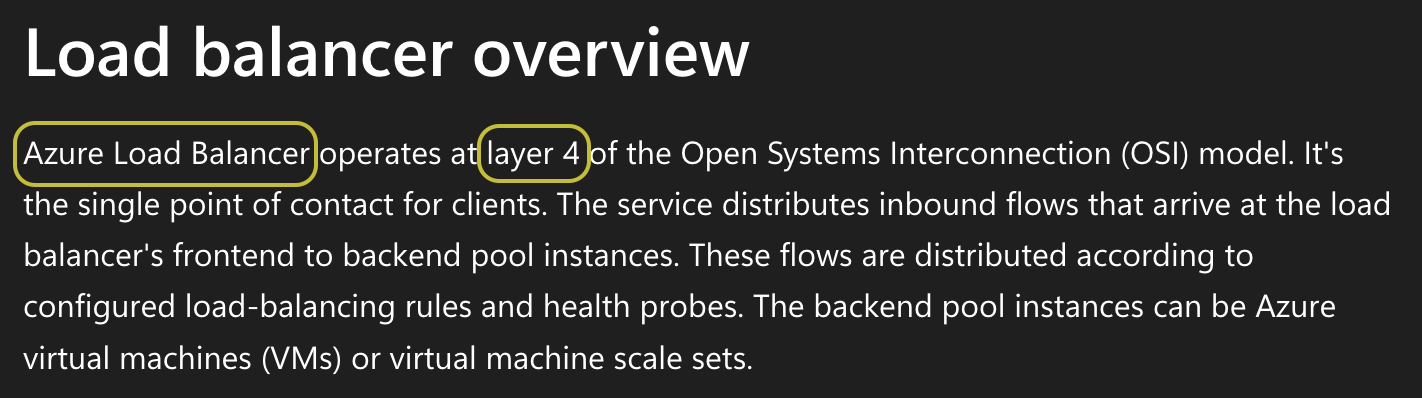
docs: azure application gateway
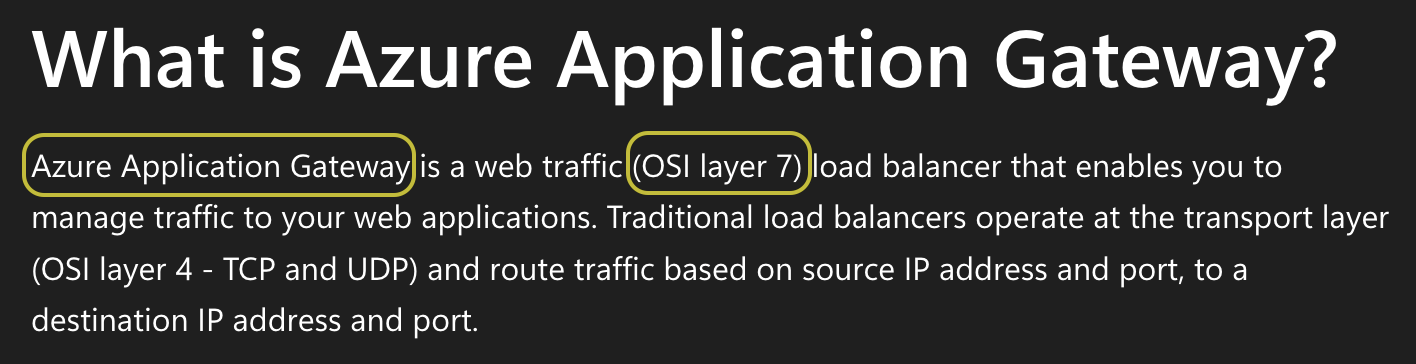
AWS의 NLB(Network Load Balancer) 가 Azure의 Load Balancer 이고,
AWS의 ALB(Application Load Balancer) 는 Azure의 Application Gateway이다.
| AWS 서비스 | Azure 서비스 | 계층 |
|---|---|---|
| NLB (Network Load Balancer) | Azure Load Balancer | L4 |
| ALB (Application Load Balancer) | Application Gateway | L7 |
☑️ Azure Load Balancer의 분산 방식은?
Azure Load Balancer는 5-tuple 해시를 사용한다.
- Source IP
- Source Port
- Destination IP
- Destination Port
- Protocol
이 다섯 값을 해싱해 백엔드 풀(Backend pool) 의 VM 중 하나를 선택한다.
Azure Docs: Backend pool management
따라서 Source Port가 바뀔 때마다 다른 VM으로 라우팅되고,
겉보기에는 Round-Robin 스케줄링처럼 느껴질 수 있다.
☑️ 테스트 환경 구성
- VM 3대(Standard_B1s)
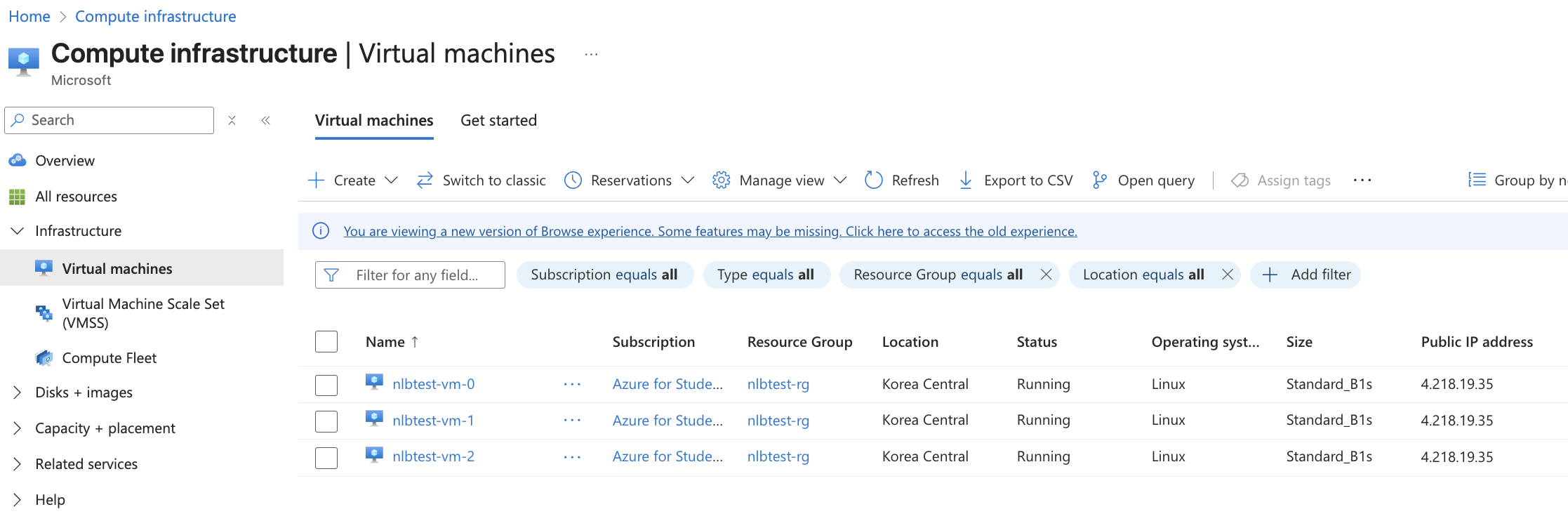
- Azure Load Balancer 한개
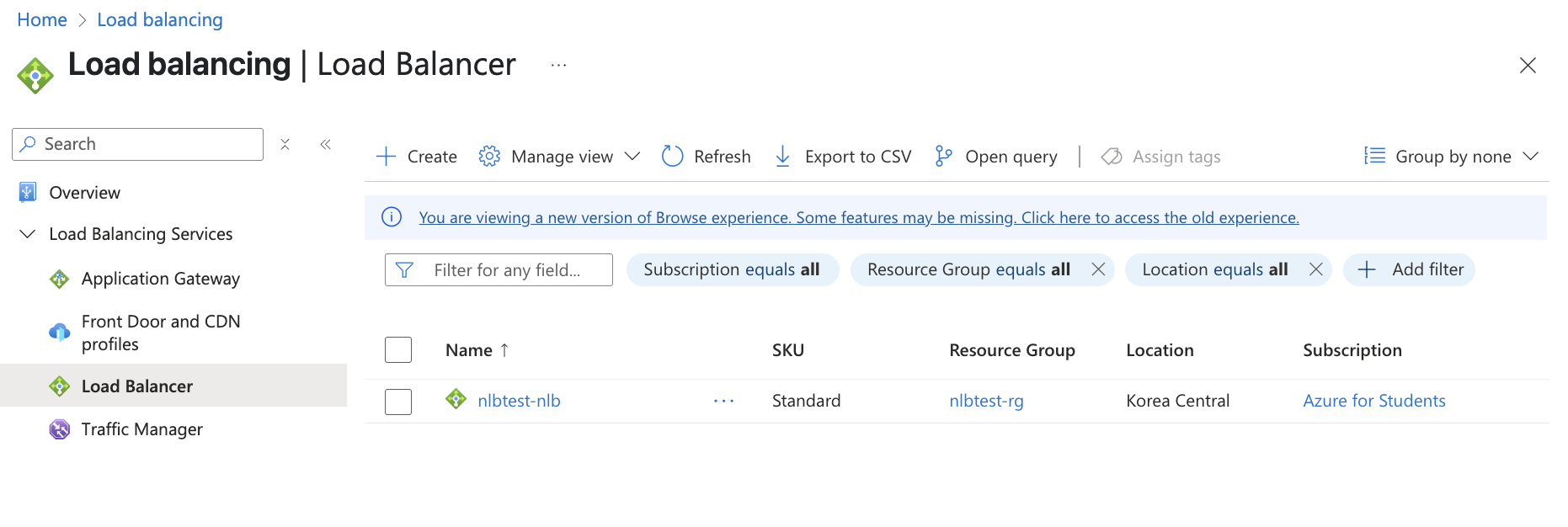
- 3개의 VM을 호스팅하도록 Backend pools 구성
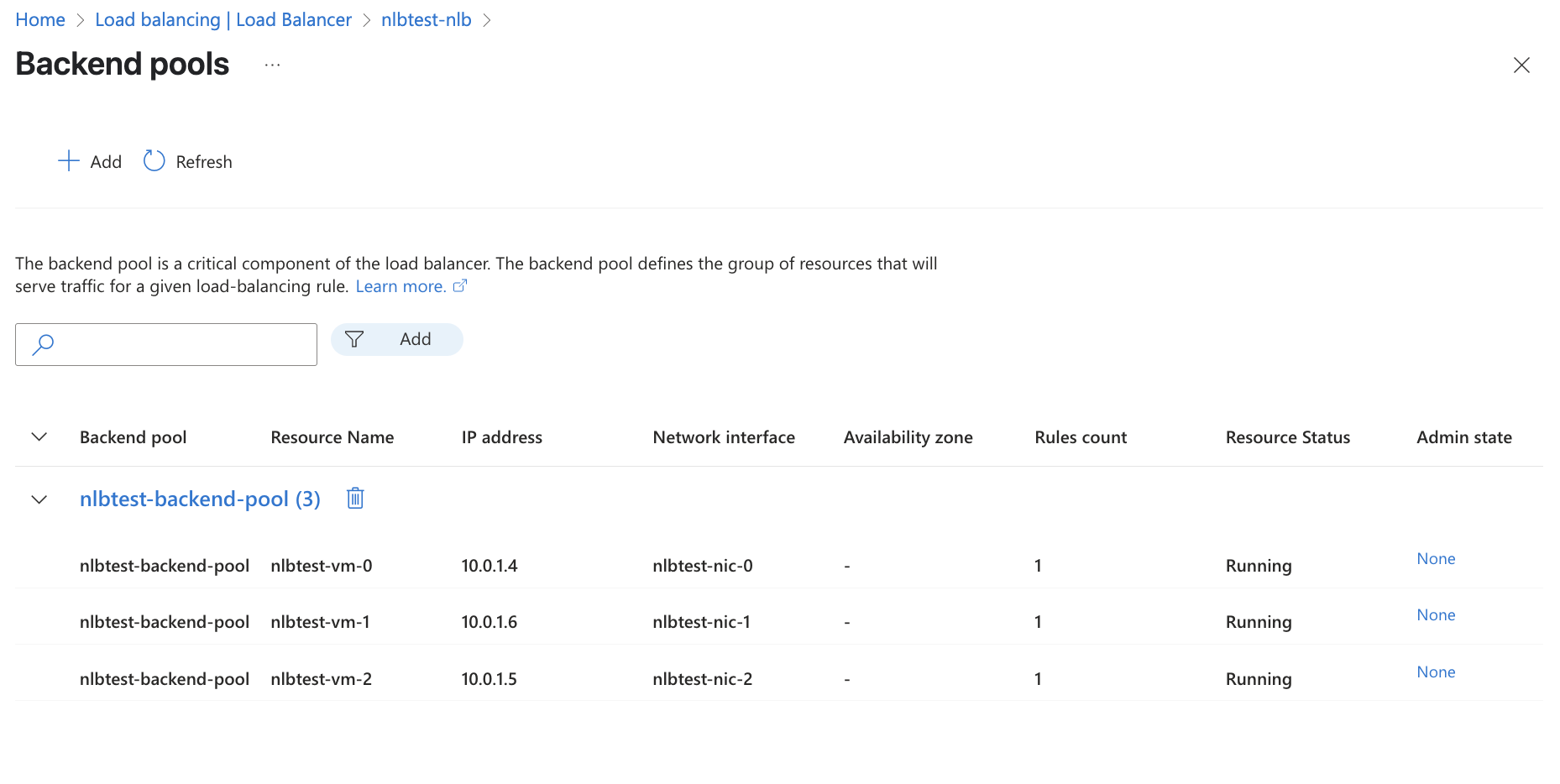
- 추가적으로 Terraform을 사용해서 네트워크, 보안 그룹, VM, NLB 리소스 구성
사용한 Terraform 파일 (main.tf)
# provider "azurerm" {
#   features {}
# }

provider "azurerm" {
  features {}

  subscription_id = xxxxxxxxxxxxxxxxxxxxxxxxxxxxxxx
}

resource "azurerm_resource_group" "rg" {
  name     = "nlbtest-rg"
  location = "Korea Central"
}

resource "azurerm_virtual_network" "vnet" {
  name                = "nlbtest-vnet"
  address_space       = ["10.0.0.0/16"]
  location            = azurerm_resource_group.rg.location
  resource_group_name = azurerm_resource_group.rg.name
}

resource "azurerm_subnet" "subnet" {
  name                 = "nlbtest-subnet"
  resource_group_name  = azurerm_resource_group.rg.name
  virtual_network_name = azurerm_virtual_network.vnet.name
  address_prefixes     = ["10.0.1.0/24"]
}

resource "azurerm_public_ip" "lb_pip" {
  name                = "nlbtest-nlb-pip"
  location            = azurerm_resource_group.rg.location
  resource_group_name = azurerm_resource_group.rg.name
  allocation_method   = "Static"
  sku                 = "Standard"
}

resource "azurerm_lb" "nlb" {
  name                = "nlbtest-nlb"
  location            = azurerm_resource_group.rg.location
  resource_group_name = azurerm_resource_group.rg.name
  sku                 = "Standard"

  frontend_ip_configuration {
    name                 = "frontend"
    public_ip_address_id = azurerm_public_ip.lb_pip.id
  }
}

resource "azurerm_lb_backend_address_pool" "bepool" {
  name            = "nlbtest-backend-pool"
  loadbalancer_id = azurerm_lb.nlb.id
}

resource "azurerm_network_security_group" "nsg" {
  name                = "nlbtest-nsg"
  location            = azurerm_resource_group.rg.location
  resource_group_name = azurerm_resource_group.rg.name

  security_rule {
    name                       = "allow-http"
    priority                   = 100
    direction                  = "Inbound"
    access                     = "Allow"
    protocol                   = "Tcp"
    source_port_range          = "*"
    destination_port_range     = "80"
    source_address_prefix      = "*"
    destination_address_prefix = "*"
  }

  security_rule {
    name                       = "allow-ssh"
    priority                   = 110
    direction                  = "Inbound"
    access                     = "Allow"
    protocol                   = "Tcp"
    source_port_range          = "*"
    destination_port_range     = "22"
    source_address_prefix      = "*"
    destination_address_prefix = "*"
  }
}

resource "azurerm_network_interface" "nic" {
  count               = 3
  name                = "nlbtest-nic-${count.index}"
  location            = azurerm_resource_group.rg.location
  resource_group_name = azurerm_resource_group.rg.name

  ip_configuration {
    name                          = "internal"
    subnet_id                     = azurerm_subnet.subnet.id
    private_ip_address_allocation = "Dynamic"
  }
}

resource "azurerm_network_interface_backend_address_pool_association" "nic_lb_assoc" {
  count                     = 3
  network_interface_id      = azurerm_network_interface.nic[count.index].id
  ip_configuration_name     = "internal"
  backend_address_pool_id   = azurerm_lb_backend_address_pool.bepool.id
}

resource "azurerm_network_interface_security_group_association" "nic_nsg" {
  count                     = 3
  network_interface_id      = azurerm_network_interface.nic[count.index].id
  network_security_group_id = azurerm_network_security_group.nsg.id
}

resource "azurerm_linux_virtual_machine" "vm" {
  count               = 3
  name                = "nlbtest-vm-${count.index}"
  location            = azurerm_resource_group.rg.location
  resource_group_name = azurerm_resource_group.rg.name
  size                = "Standard_B1s"
  admin_username      = "azureuser"
  network_interface_ids = [azurerm_network_interface.nic[count.index].id]

  admin_ssh_key {
    username   = "azureuser"
    public_key = file("~/.ssh/id_rsa.pub") # SSH 키 경로 확인 필요
  }

  os_disk {
    caching              = "ReadWrite"
    storage_account_type = "Standard_LRS"
  }

  source_image_reference {
    publisher = "Canonical"
    offer     = "0001-com-ubuntu-server-jammy"
    sku       = "22_04-lts"
    version   = "latest"
  }

  custom_data = base64encode(<<-EOF
              #!/bin/bash
              apt update
              apt install -y nginx
              echo "Hello from VM ${count.index}" > /var/www/html/index.html
              systemctl enable nginx
              systemctl restart nginx
              EOF
  )
}

resource "azurerm_lb_probe" "probe" {
  name            = "http-probe"
  loadbalancer_id = azurerm_lb.nlb.id
  protocol        = "Tcp"
  port            = 80
}

resource "azurerm_lb_rule" "lbrule" {
  name                           = "http-rule"
  loadbalancer_id                = azurerm_lb.nlb.id
  protocol                       = "Tcp"
  frontend_port                  = 80
  backend_port                   = 80
  frontend_ip_configuration_name = "frontend"
  backend_address_pool_ids       = [azurerm_lb_backend_address_pool.bepool.id]
  probe_id                       = azurerm_lb_probe.probe.id
}

output "lb_public_ip" {
  value = azurerm_public_ip.lb_pip.ip_address
}
☑️ 테스트 결과 확인
Curl명령어와 tcpdump 명령어를 통해서 확인하기
- Terraform
output.tf에서 확인한 Public IP

- Public IP로 여러 번
curl을 실행하면VM0 → VM1 → VM2순서로 응답이 돌아온다.
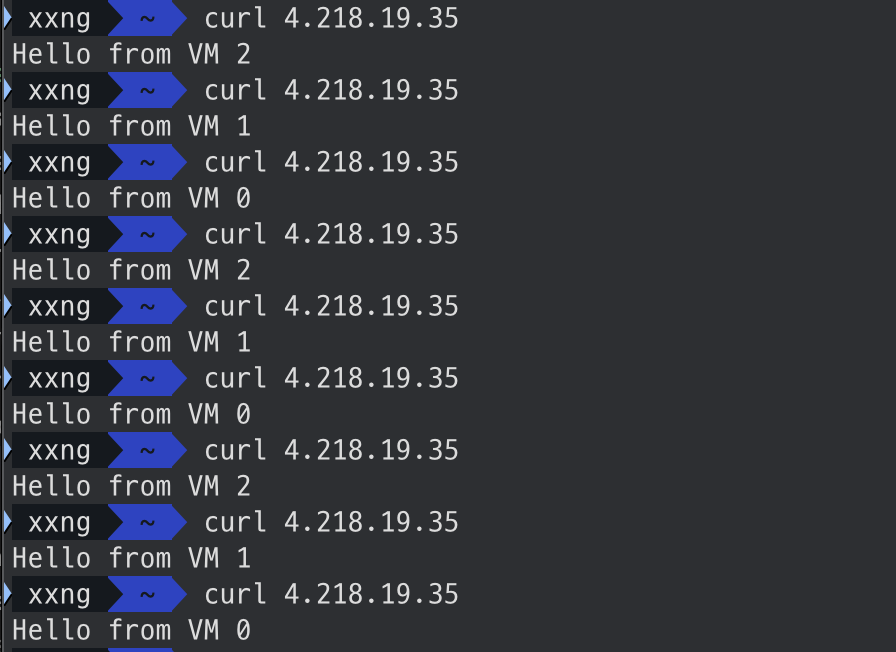
seq명령어로 다시 요청을 보내보면 각 순서대로 요청을 받는 것을 확인할 수 있다.
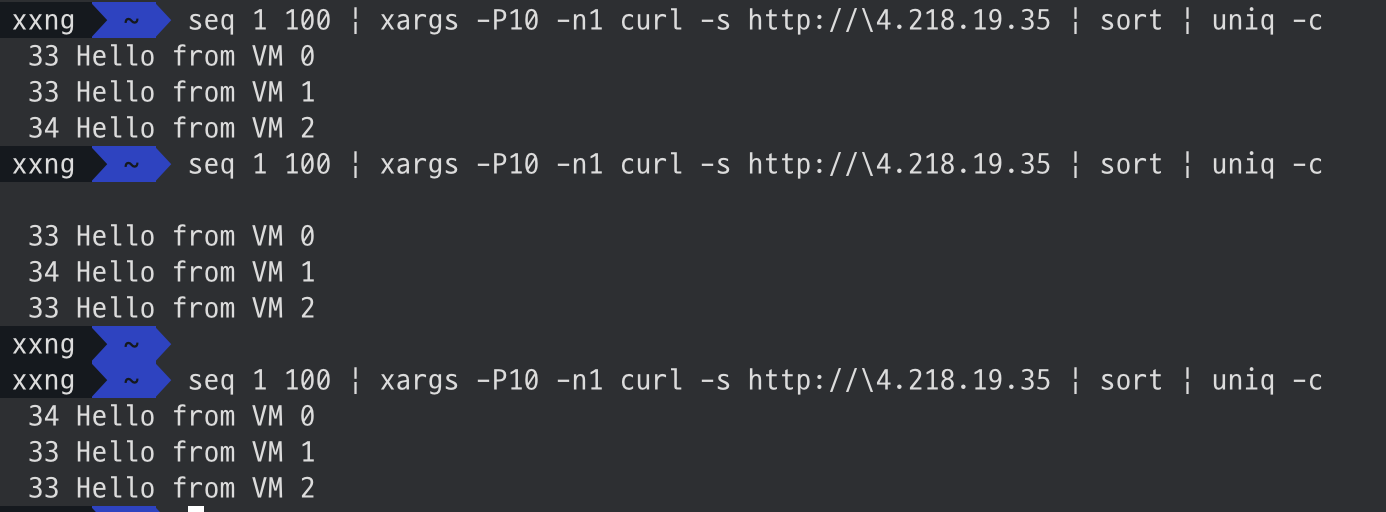
결국 5-튜플 중 source port만 계속 바뀌면, 해시 결과도 달라져서 VM2 → VM1 → VM0 처럼 Round-Robin 효과가 나는 것처럼 보이는 것이다.
- 각 VM에서
tcpdump로 캡처해 보면 Source Port가 매 요청마다 바뀌는 것을 확인할 수 있다.
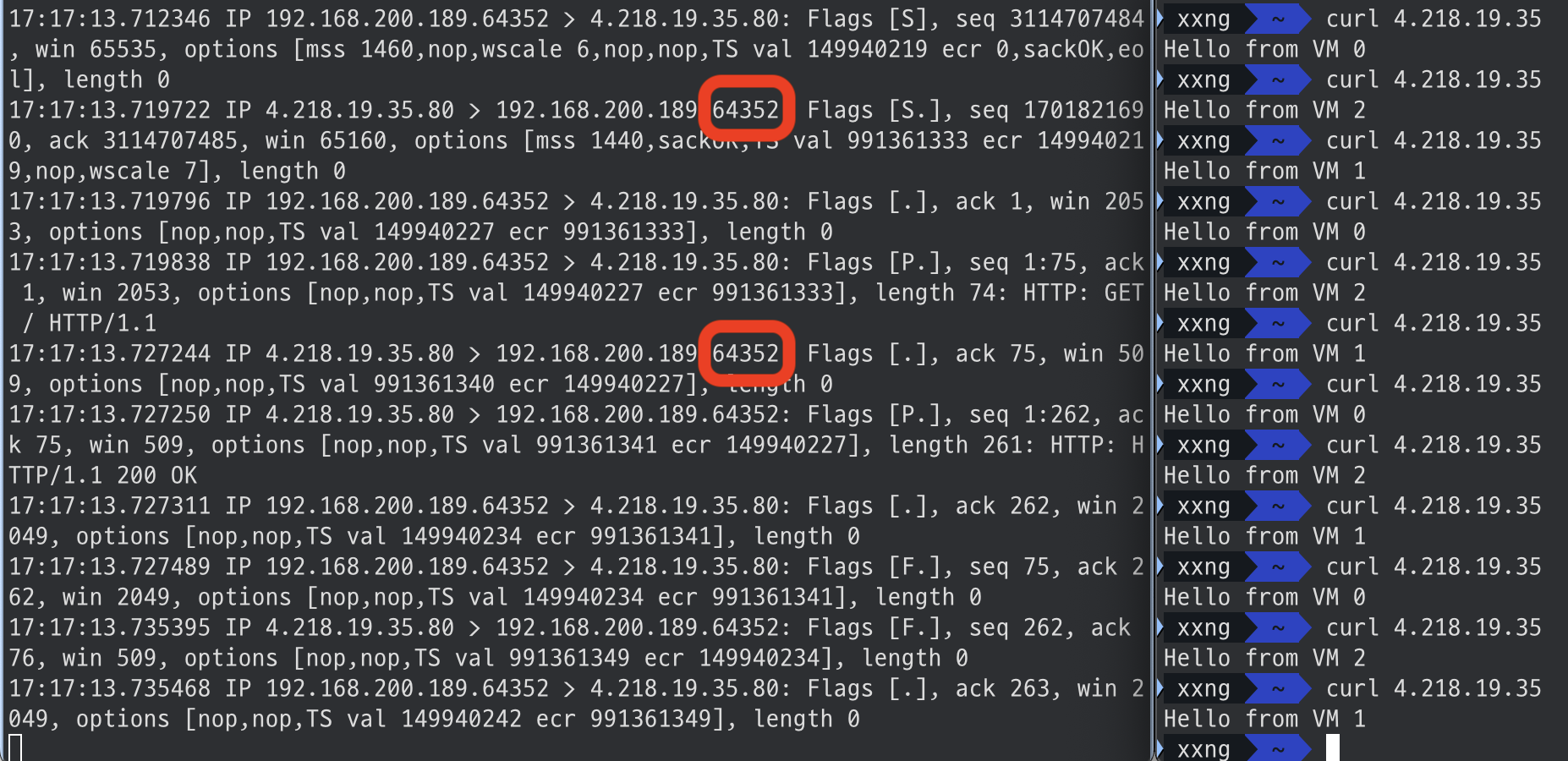
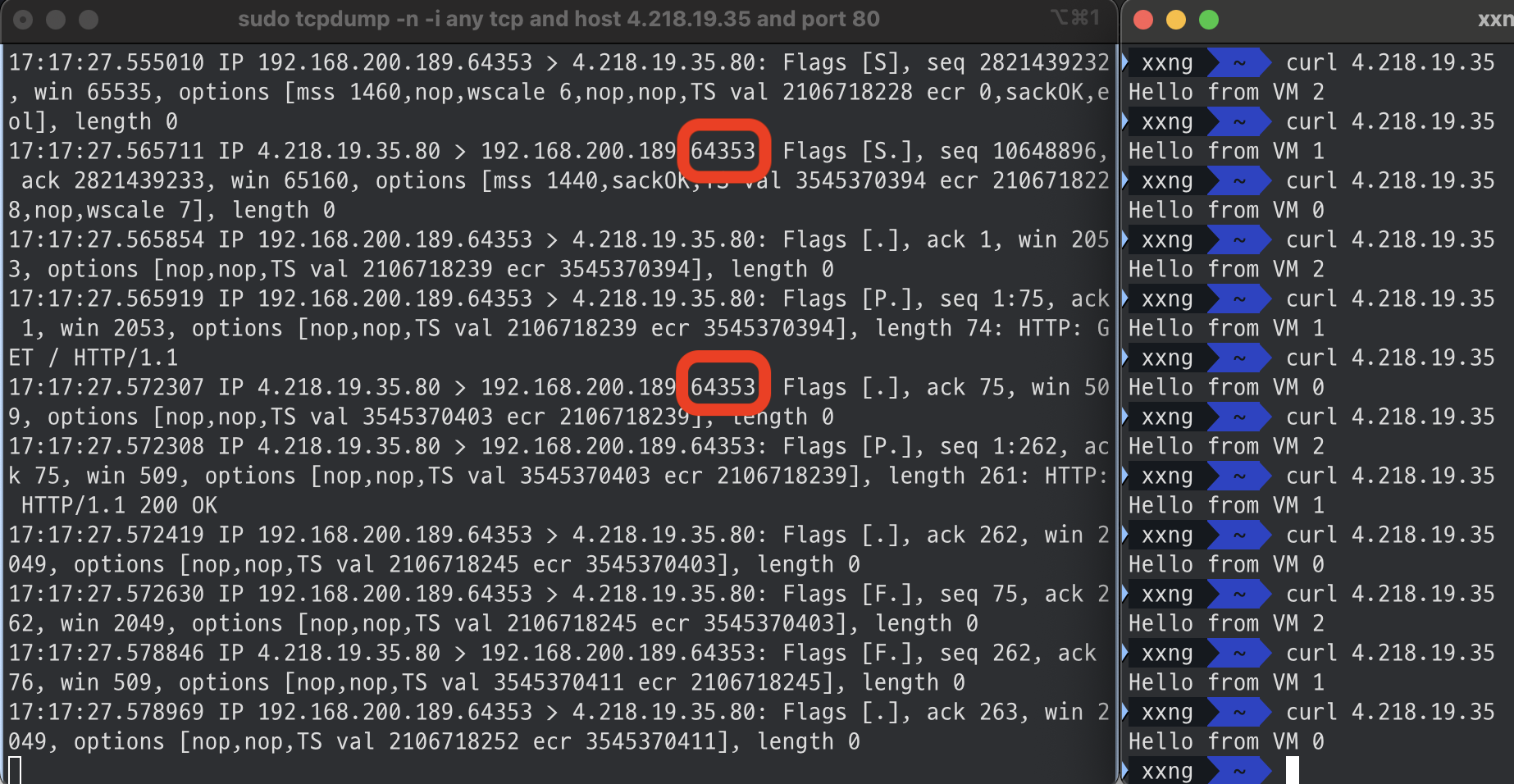
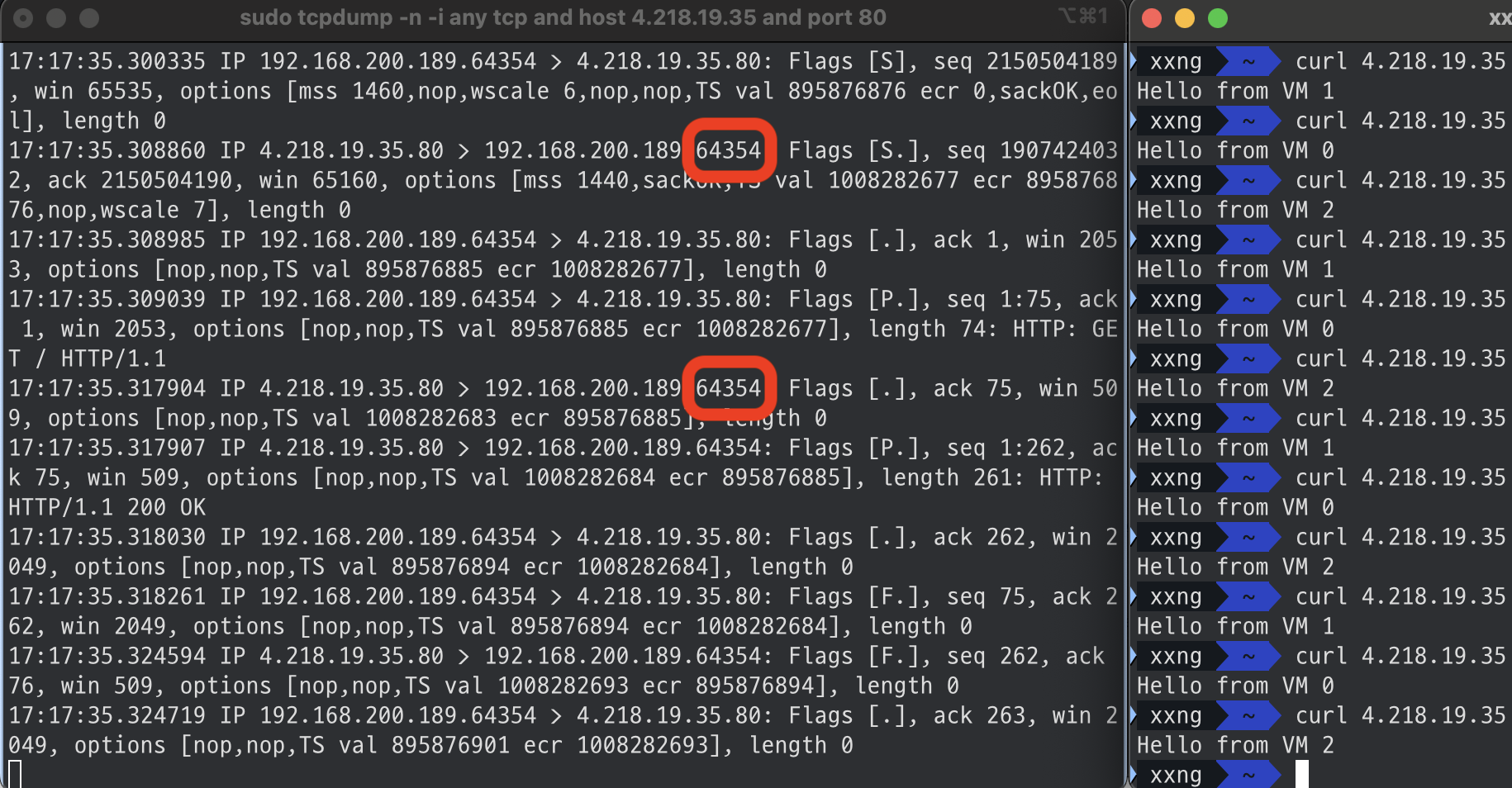
이에 따라 5-tuple Hash 값이 달라지고, Azure NLB가 다른 백엔드 VM으로 요청을 보내는 것이다.
☑️ Azure Load Balancer 성능 테스트
k6를 사용한 부하 테스트
테스트 스크립트 (nlb-test.js)
import http from 'k6/http';
import { check } from 'k6';

export const options = {
  vus: 10000,
  duration: '10s',
};

export default function () {
  const res = http.get('http://4.218.19.35');
  check(res, {
    'status is 200': (r) => r.status === 200,
    'body includes VM banner': (r) =>
      ['Hello from VM 0', 'Hello from VM 1', 'Hello from VM 2'].some((text) => r.body.includes(text)),
  });
}
1. Smoke Test
- 10명 사용자, 10초 수행
xxng ~/desktop/terraform/nlb-website/az k6 run nlb-test.js
/\ Grafana /‾‾/
/\ / \ |\ __ / /
/ \/ \ | |/ / / ‾‾\
/ \ | ( | (‾) |
/ __________ \ |_|\_\ \_____/
execution: local
script: nlb-test.js
output: -
scenarios: (100.00%) 1 scenario, 10 max VUs, 40s max duration (incl. graceful stop):
* default: 10 looping VUs for 10s (gracefulStop: 30s)
█ TOTAL RESULTS
checks_total.......................: 16664 1665.01504/s
checks_succeeded...................: 100.00% 16664 out of 16664
checks_failed......................: 0.00% 0 out of 16664
✓ status is 200
✓ body is VM 0/1/2
HTTP
http_req_duration.......................................................: avg=11.76ms min=4.96ms med=9.18ms max=115.66ms p(90)=13.04ms p(95)=18.13ms
{ expected_response:true }............................................: avg=11.76ms min=4.96ms med=9.18ms max=115.66ms p(90)=13.04ms p(95)=18.13ms
http_req_failed.........................................................: 0.00% 0 out of 8332
http_reqs...............................................................: 8332 832.50752/s
EXECUTION
iteration_duration......................................................: avg=11.99ms min=4.99ms med=9.31ms max=115.82ms p(90)=14.36ms p(95)=19.19ms
iterations..............................................................: 8332 832.50752/s
vus.....................................................................: 10 min=10 max=10
vus_max.................................................................: 10 min=10 max=10
NETWORK
data_received...........................................................: 2.2 MB 217 kB/s
data_sent...............................................................: 558 kB 56 kB/s
running (10.0s), 00/10 VUs, 8332 complete and 0 interrupted iterations
default ✓ [======================================] 10 VUs 10s
2. Load Test
- 100명 사용자, 60초 수행
xxng ~/desktop/terraform/nlb-website/az k6 run nlb-test.js
/\ Grafana /‾‾/
/\ / \ |\ __ / /
/ \/ \ | |/ / / ‾‾\
/ \ | ( | (‾) |
/ __________ \ |_|\_\ \_____/
execution: local
script: nlb-test.js
output: -
scenarios: (100.00%) 1 scenario, 100 max VUs, 1m30s max duration (incl. graceful stop):
* default: 100 looping VUs for 1m0s (gracefulStop: 30s)
█ TOTAL RESULTS
checks_total.......................: 708564 11790.398986/s
checks_succeeded...................: 100.00% 708564 out of 708564
checks_failed......................: 0.00% 0 out of 708564
✓ status is 200
✓ body is VM 0/1/2
HTTP
http_req_duration.......................................................: avg=16.71ms min=4.65ms med=10.85ms max=377.83ms p(90)=25.17ms p(95)=35.28ms
{ expected_response:true }............................................: avg=16.71ms min=4.65ms med=10.85ms max=377.83ms p(90)=25.17ms p(95)=35.28ms
http_req_failed.........................................................: 0.00% 0 out of 354282
http_reqs...............................................................: 354282 5895.199493/s
EXECUTION
iteration_duration......................................................: avg=16.93ms min=4.71ms med=10.96ms max=385.62ms p(90)=25.51ms p(95)=35.93ms
iterations..............................................................: 354282 5895.199493/s
vus.....................................................................: 100 min=100 max=100
vus_max.................................................................: 100 min=100 max=100
NETWORK
data_received...........................................................: 93 MB 1.5 MB/s
data_sent...............................................................: 24 MB 395 kB/s
running (1m00.1s), 000/100 VUs, 354282 complete and 0 interrupted iterations
default ✓ [======================================] 100 VUs 1m0s
3. Stress Test
- 10000명 사용자, 10초 수행
█ TOTAL RESULTS

    checks_total.......................: 55964  1396.780297/s
    checks_succeeded...................: 71.42% 39970 out of 55964
    checks_failed......................: 28.57% 15994 out of 55964

    ✗ status is 200
      ↳  71% — ✓ 19985 / ✗ 7997
    ✗ body is VM 0/1/2
      ↳  71% — ✓ 19985 / ✗ 7997

    HTTP
    http_req_duration.......................................................: avg=3.61s min=0s     med=858.28ms max=33.14s p(90)=8.99s p(95)=11.2s
      { expected_response:true }............................................: avg=4.46s min=6.83ms med=1.48s    max=33.14s p(90)=9.4s  p(95)=11.31s
    http_req_failed.........................................................: 28.57% 7997 out of 27982
    http_reqs...............................................................: 27982  698.390149/s

    EXECUTION
    iteration_duration......................................................: avg=3.99s min=1.72ms med=1.58s    max=33.14s p(90)=9.22s p(95)=11.2s
    iterations..............................................................: 27982  698.390149/s
    vus.....................................................................: 454    min=454           max=10000
    vus_max.................................................................: 10000  min=10000         max=10000

    NETWORK
    data_received...........................................................: 5.2 MB 130 kB/s
    data_sent...............................................................: 2.1 MB 52 kB/s


running (40.1s), 00000/10000 VUs, 27982 complete and 454 interrupted iterations
default ✓ [======================================] 10000 VUs  10s
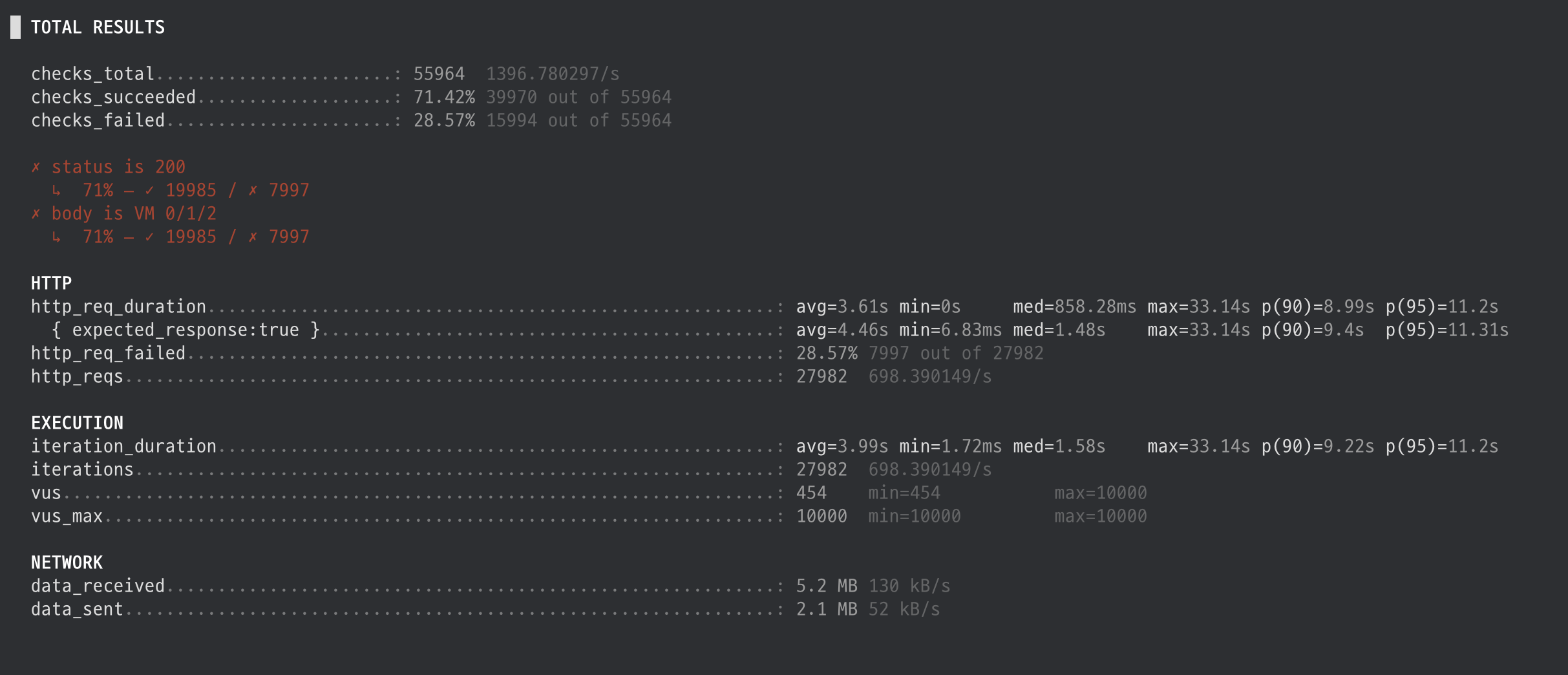
- 스트레스 테스트에는 버티지 못하는 모습
☑️ 결론
- Azure Load Balancer 는 매우 낮은 지연을 제공하고, 단순 트래픽 분산에는 충분히 좋은 선택이다.
- 하지만 URL 라우팅, 스티키 세션 등 L7 기능이 필요하다면 여전히 ALB가 적합하다.
- 고부하 상황에서는 한계가 드러났다.
| 항목 | 10 VUs / 10s | 100 VUs / 60s | 10,000 VUs / 10s |
|---|---|---|---|
| RPS | ~830 | ~5,900 | ~698 |
| 평균 응답 시간 | ~11.7ms | ~16.7ms | ~3.6s |
| 최대 응답 시간 | ~115ms | ~378ms | ~33s |
| 성공률 | 100% | 100% | 71.4% (28.6% 실패) |